SKU: 97487131197

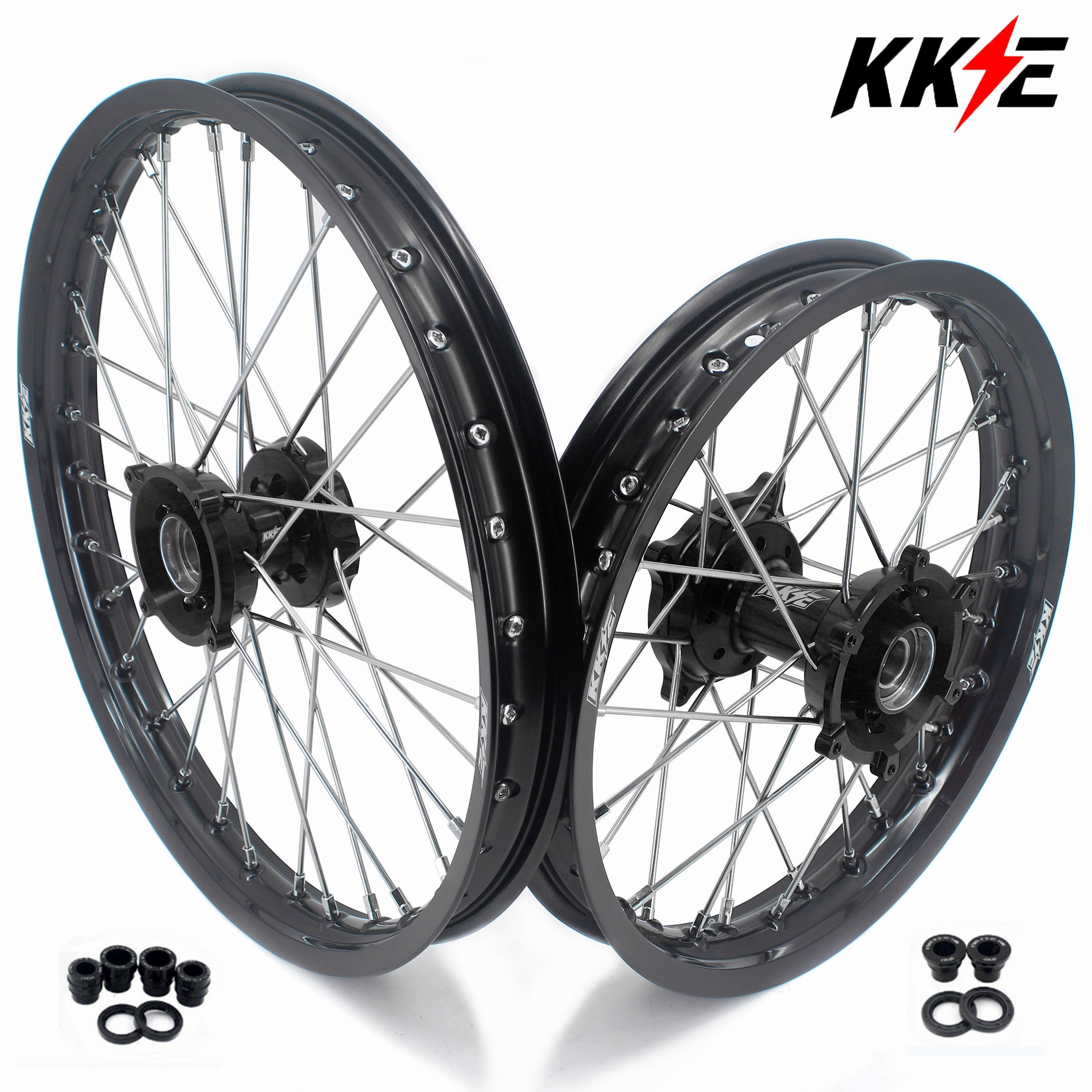
KKE Factory Size Small Kid's Wheels 17" 14" GLM Rims For KTM SX 85 2021-2024 Black Hub

Sale price$202.05 Regular price$224.50
Save 10%

Pay in installments of $56.12 with ShopPay, AfterPay and Klarna

Shipping Estimate
USA
  • USA
  • CAN

Ships within 48 hours · Estimated delivery Sep 1 - Sep 6

Promo Codes Available:

For Your Every Summer RSVP, with Code: SUMMER15

Description

KKE Factory Size Small Kid's Wheels 17" 14" GLM Rims For KTM SX 85 2021-2024 Black HubCNC 17 14 Small Kid's Wheel Kit For KTM Features: 6082T6 Aluminum CNC Produced Hub 7050T6 Aluminum Rim 304 Stainless Steel Spoke With Brass Nipples Front and Rear Wheel With Bearing Spacers & Seals Wheels Already Assembled With Hub, Rim, Spoke, Nipples, Tube and Bearings The seal & spacer is packed in small package. Rim Size: Front Rim=1. 4*17 inch Rear Rim=1. 6*14 inch Fitment: For KTM SX 85 2021 2024 For GAS GAS MC 85 2021 2024 For HUSQVARNA TC 85

CNC 17/14 Small Kid's Wheel Kit For KTM

Features:
  • 6082T6 Aluminum CNC Produced Hub
  • 7050T6 Aluminum Rim
  • 304 Stainless Steel Spoke With Brass Nipples
  • Front and Rear Wheel With Bearing Spacers & Seals
  • Wheels Already Assembled With Hub, Rim, Spoke, Nipples, Tube and Bearings
  • The seal & spacer is packed in small package.


    Rim Size:

    • Front Rim=1.4*17 inch
    • Rear Rim=1.6*14 inch


    Fitment:

    • For KTM SX 85  2021-2024
    • For GAS GAS MC 85  2021-2024
    • For HUSQVARNA TC 85  2024
    • Wheels Are Compatible With OEM Disc and Sprocket
    • Please Double Check Your Fitment When Check Out!


    Color Comb:

    • Black Hub
    • Black Rim
    • Silver Nipple
    • Silver Spoke


    Additional Information:

    • One year manufacturer defect warranty on all wheels (includes hub rim & spoke)
    • Our wheels are fully adjusted and spokes are tighten during assembly. However, we still recommend buyer to double check and tightening both the front and rear spokes before riding. This is to make wheels keep a balanced level of tension in their components.


      Tips of Cleaning Rims:

      • Please note that wheels can only be washed with "mild soap"
      • Do not wash rim with Natrium hydroxide based liquids(like "wheel  wash" and "iron removers") , these will spoil the Anodization immediately, then the color will be faded


      Disclaimer:

      • “[KKE RACING]'s parts are not sponsored or endorsed by, or affiliated with, KTM, Duke, Husaberg, Husqvarna, Honda, Yamaha, Kawasaki, Suzuki, Beta, TM, Gas Gas, Sherco, BMW, Ducati, Triumph, Harley,Davidson etc .” All KKE parts are after market replacement parts for these brands.
        Shipping Notes
        • Free Standard Shipping on $100+ Orders to the USA.
        • Except Preorder products are shipped in 48 hours.
        • Delivery to the USA:
        1. Standard Shipping : 3-10 business days
        • If time is of the essence, please consider selecting expedited delivery for faster service.
        Exchange/Return Notes
        • We offer a 30-day return/exchange service after receiving.
        • Final sale items are not eligible for returns or exchanges.
        • To process your return/exchange, please contact us at [email protected]
        • Please click here for more details>>> Return & Exchange Policy
        SKU: 97487131197

        Discover Niche Categories That Outsell

        Top-Converting Item to Boost Your Average Order

        4.3 ★★★★★
        Based on 7 reviews
        Sort
        Highest Rating
        Newest First
        Oldest First
        Product Reviews
        E
        Verified Cardmember
        ederath
        Phoenix, US
        ★★★★★ 1
        New Online Access Security Features Actually Compromise Security
        Style: Prime Visa
        While I started out very satisfied with my Amazon Prime Visa, I have since become discouraged and frustrated. When I first started using my card, I was accumulating my reward points on a regular basis and they were representative of the purchases I made, both on Amazon and through other vendors. But over the last couple years, I noticed I wasn't earning as many points as I had before and especially for Amazon purchases. There were discrepancies in the points I expected to earn and what were actually awarded. The few times I called to inquire about this it was a hassle to get through to a live customer service representative. I seldom used the card anywhere but on Amazon and truth be told, I expected to earn more using the card on Amazon than I actually did. But the most important reason my opinion of this card has changed for the negative is because of recently implemented security procedures for accessing my account online. I have had my card for well over 10 years and never had an issue signing into my account. Like most online accounts, an extra security layer was added where after logging in, a security code was emailed or sent to my phone to let me complete the log in process. But starting last year, logging into my account became not only a hassle but ironically more of a security concern than what the process was designed to protect. I would use my password, enter the security code that was emailed or texted to me, but then see a screen telling me that "more information was needed" and to call an 800 number to speak with a customer representative. I would call the 800 number only to have a voice prompt ask me to then enter my card number, my zip code, my date of birth and MY SOCIAL SECURITY NUMBER! Only then was I connected to a live person who would then give me yet another security number to be entered online and then I could finally access my account. The first time it happened, I called customer service and asked what this was about. I was told it was just a "random" check that is done to verify my identity. I was assured it didn't happen regularly and that gone through the process once, it shouldn't happen again. But the next time I logged in it did. I called customer service again but this time I was told it was because I had selected there to be this secondary security check myself. I explained that I had done no such thing. The customer service rep claimed to check my account on their end and said yes, it appeared my account indeed had a secondary security check option selected. I asked if it could be removed explaining that I was very uncomfortable providing all that additional information through a voice prompt system. The customer service presentative told me that she was able to remove the secondary security check and that the next time I logged in there shouldn't be any issue. But the 3rd time I attempted to log in I had to yet again go through this secondary security check. Once again I called customer service. This time I was told that there must be some type of glitch in my online account and I was transferred to the technical support department. The support tech claimed that there was this "secondary security" layer enabled on my account but assured me he was able to remove it on his end. He also assured me that the issue was finally corrected and I should be able to log in going forward without this extra security hassle. Yet again the next time I logged in I was still being asked to call the 800 number and provide all that information through the voice prompt system, including my social security number. At that point I asked to be transferred to a technical support securitiy manager. After giving me all the same previously provided explanations and claiming to have fixed the issue (he didn't) and almost an hour of my time, he finally explained that the problem was on MY end. This extra security layer was NOT implemented by Amazon or Visa. Instead, it was implemented by their 3rd-party vendor that actually administers online accounts and processes online payments. It turns out that while it was intended to be a one-time verification, any deletion of cookies and cache from my computer would reset my account as needing this secondary verification. My response was that I regularly delete cookies and my cache as a security measure. The tech said that if I want to avoid this secondary verification, I should stop deleting cookies and cache, PLUS disable auto-deletion in my browser. I explained that while disabling auto-deletion on my browser could solve the issue, it would disable auto-deletion for all my browsing history and that's a security issue. Moreover, if I chose not to disable auto-deletion then every single time I wanted to access my online account I would be required to enter personally identifiable information (my social security number) which is also a security risk. The tech reluctantly agreed but said that their customer service had no control over this because it was added by that 3rd party account/payment processing vendor. All this being said, I stopped using my Amazon Visa card. I opened a new credit card through my bank that was offering a $300 cash-back bonus for spending $600 over the first 3 months. I'm able to log into that online account using my login, password and the verification number that was simply sent to me via email or text. I don't need to provide all the personal information for a secondary security verification through a voice-prompt system and I'm still able to clear my cookies and cache on a regular basis. This experience was frustrating for several reasons. First and foremost, I was never told about this secondary security layer that had been added for online access despite being a cardholder for over 10 years. Second, when I attempted to inquire why there was a secondary security layer, I spoke with 3 different customer reps who each gave me a different and erroneous explanation for why the secondary security layer was there in the first place. Third, each of those customer service reps assured me the issue was corrected only for that to not be true. And finally, the secondary security layer provided no real extra security without potentially compromising the health and security of the device that I was using to access my account. In the end, there's more than enough security issues to watch for when using online devices and accessing sensitive account information. Safety is important but so is ease-of-use. The Amazon Prime Visa card has become more of a liability to use for both safety and convenience than the purported benefits that the card offers. Moreover, it is completely unacceptable that 3 customer service reps gave me 3 different and erroneous explanations for what I was experiencing and it is egregious that none of those explanations were even correct. In the end, it's my opinion that there are better cards with better rewards that employ more informed customer service reps with online access security features.
        WAS THIS REVIEW HELPFUL?YesReportShare
        Reviewed in the United States on January 14, 2026
        I
        Verified Purchase
        IRL
        Louisville, US
        ★★★★★ 5
        Easy and worked seamlessly with the new Apple MacBook Pro
        Style Name: MacBook Pro 14" (M4), Configuration: 3 years
        This was our first (Apple MacBook Pro M4) and big purchase directly on Amazon. I was not concerned about the order and product, but more concerned about the AppleCare+ not being connected directly to the device (after reading some reviews). However, I am happy to report that this was the first thing I checked as soon as we set up our computer. We are set for 3 years ... so thank you, Amazon and Apple, for working out the backend stuff and making our lives easier. It worked for us. It was easy, and I am happy with the overall quality of the process. Oh, don't forget it was cheaper than buying yearly from Apple directly.
        WAS THIS REVIEW HELPFUL?YesReportShare
        Reviewed in the United States on October 16, 2025
        E
        Verified Purchase
        E
        Carnegie, US
        ★★★★★ 1
        Don't buy AppleCare from Amazon, won't "attach" to your device automatically
        Style Name: MacBook Pro 14" (M4), Configuration: 3 years
        As another reviewer said, Amazon should not be allowed to sell digital items like these and fail to deliver them. That's called a scam. I have yet to receive my AppleCare agreement, but Amazon was more than glad to charge my Amex right away. Purchasing AppleCare from Amazon will only get you to a download of a PDF of the general terms and conditions, from your "Software Library", but it is not YOUR actual user agreement, and will not register on your device. Amazon will not help either, they will refer you to Apple support, and Apple will tell you that without an Agreement Number, they can't apply your AppleCare to your device. Since the PDF Amazon directs you to is a simple General Terms and Conditions document, there is no Agreement Number. In addition, the purchase invoice doesn't show this Agreement Number nor the device's Serial Number (which Amazon claims is recorded with the purchase... it's not) Save yourself the headache, and buy AppleCare direct from Apple, it will be about $60 more, but the "savings" is not worth dealing with this Amazon stuff. Amazon will also refuse to process a refund, stating that "only Apple can do that". Guess Amazon is telling you to contact your credit card and initiate a chargeback for services not received as paid.
        WAS THIS REVIEW HELPFUL?YesReportShare
        Reviewed in the United States on November 27, 2024
        T
        Verified Purchase
        Telic
        New York, US
        ★★★★★ 5
        Was skeptical but it worked out of the box
        Style Name: MacBook Air 13" (M4), Configuration: 3 years, Style Name: MacBook Air 13" (M4), Configuration: 3 years
        Was skeptical at first but decided to pull the plug and get the m4 laptop with 3 years of apple care and it works. Haven't even opened an email or anything, laptop was still fresh out of the box. When I remembered I bought apple care and decided to check. Applied instantly as far as I know once I linked my apple account on the first boot up with internet! Good stuff
        WAS THIS REVIEW HELPFUL?YesReportShare
        Reviewed in the United States on February 4, 2026
        H
        Verified Purchase
        hugo
        Houston, US
        ★★★★★ 1
        DO NOT PURCHASE WITH YOUR MACBOOK OR OTHER APPLE DEVICES
        Style Name: MacBook Air 13" (M4), Configuration: 3 years, Style Name: MacBook Air 13" (M4), Configuration: 3 years
        I bought this along with my MacBook. And here is why you SHOULDN'T: 1. They NEVER sent me an AppleCare+ Agreement. You will only be able to download a General Terms & Conditions file. 2. I bought: AppleCare+ for 13-inch MacBook Air (M4) (3 years) and in the General Terms & Conditions that I downloaded, looking for my AppleCare+ Agreement #, it NEVER mentioned Macbook Air as a covered device. It was meant for other smaller devices, which is why it's cheaper. 3. Like I mentioned, since I never received an agreement, I never got an agreement #. 4. Since this AppleCare wasn't actually meant for a MacBook, it didn't connect automatically to my computer. So when I went to talk to Apple and Amazon, without an Agreement # you can do ANYTHING. If you purchase it, read through your General Terms and Conditions and find an excuse to ask for a FULL REFUND. Since this didn't cover my computer, I was thankfully able to get one, but it was a pain trying to talk to customer support and apple.
        WAS THIS REVIEW HELPFUL?YesReportShare
        Reviewed in the United States on November 27, 2025

        recommand products